

In the recruiting world of today, video is essential in recruiting great candidates. A good recruitment video does not take a lot of words to communicate opportunities. In traditional production, planning, equipment, and editing skills are generally involved. AI tools automate these steps and guarantee a professional look. Pippit is a complete creative platform for organizations to build high-quality recruitment campaign videos, fast and efficiently, to meet a variety of hiring needs.
Why Recruitment Campaigns Benefit from AI Video Generation
Timely communication is one of the essentials for a successful recruitment campaign via various hiring platforms. Producing videos by hand delays campaigns and increases production costs. By transforming prompts and media into a polished and well-crafted video, AI video generator technology can help streamline the preparation process. Consistent employer branding is guaranteed with Pippit’s reusable visual styles and organized templates, and flexible editing. The professional layouts are more impressive and less technically complicated. Without having to learn a lot about editing, teams can create recruitment material faster. Multi-channel publishing also allows content to be easily distributed across career pages, social media, and recruitment campaigns with a cohesive visual identity and messaging.
Essential Components of an Effective Recruitment Video
A good recruiting video is informative and entertaining and has a visual that resonates with the corporate culture. Every show should have a short introduction to the company, with a mission, values, and business purpose. The job role highlights should clearly outline the job function, qualifications, and opportunities for development. But workplace culture must not be overlooked through real-life office scenes, moments of collaboration and team interaction. Compensation, learning opportunities, wellness initiatives and professional development support should all be included in employee benefits. The application process should be simple and take the candidate through the various steps in the hiring process easily. A good closing statement encourages applications and increases employer credibility and career potential.
AI Features That Strengthen Recruitment Video Creation
With the power of modern AI technology, creative production is made easy with intelligent automation across various stages of the editing process. Pippit allows for the development of a script, the structuring of scenes, voiceovers, captions, and image animation in a single process. The automatic scene development guarantees a sensible progression of the visuals and reduces manual editing. AI voiceovers help in maintaining consistent narration for recruitment campaigns in different languages. Still photos are animated into images to video. Dreamina Seedance 2.5 has higher video generation capabilities, providing more creative opportunities for different recruitment scenarios. Prompt-based editing lets for fast refinements without losing visual quality, whilst saving valuable production time by not building full projects again.
Steps to Build Recruitment Campaign Videos Instantly with AI Video Generator
Step 1: Prepare your recruitment video
- Sign up for Pippit using your Google, TikTok, or Facebook account information.
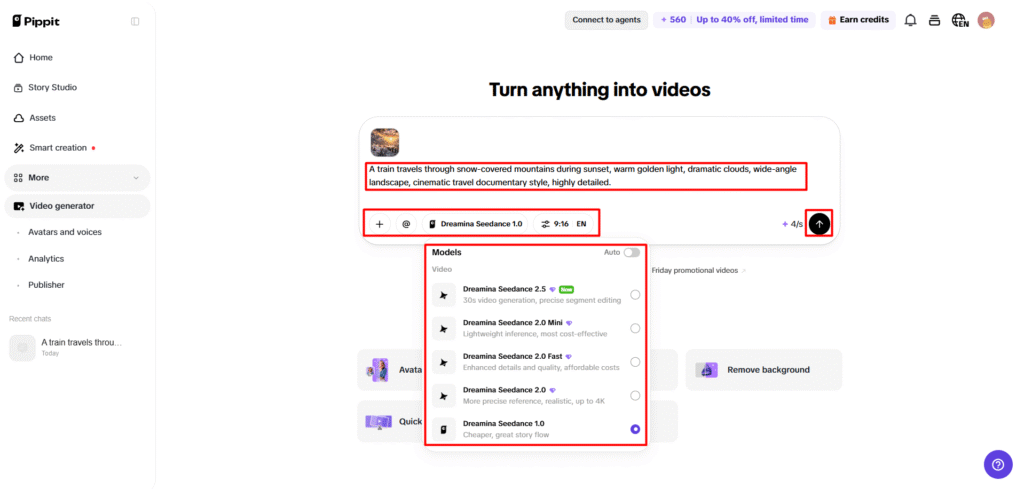
- Go to the “More” tab on the left vertical menu bar and open “Video generator”.
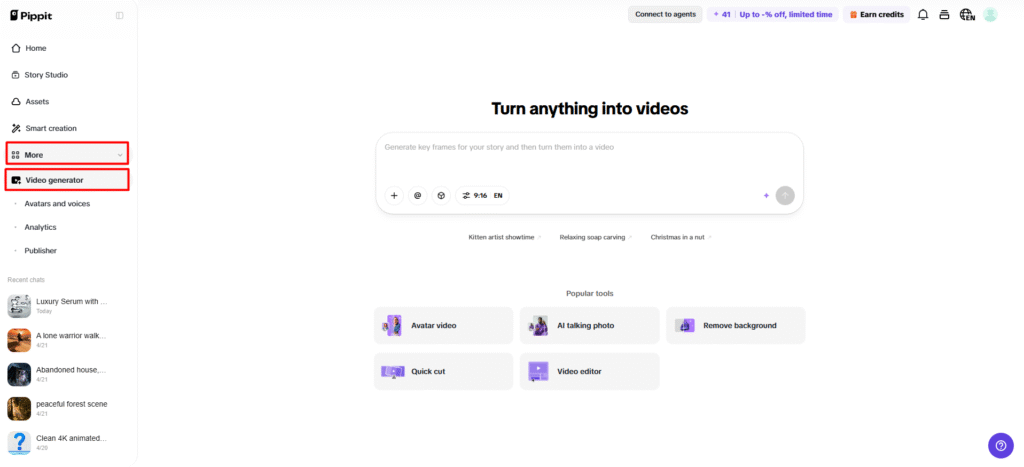
- Select an AI model, including Dreamina Seedance 1.0, Dreamina Seedance 2.0, Dreamina Seedance 2.0 Fast, Dreamina Seedance 2.0 Mini, or Dreamina Seedance 2.5.
- Enter a prompt describing your recruitment message, company style, and video requirements.
- Select video length, language, subtitles, and aspect ratio.
- Upload reference images or videos by clicking “+” from your device, phone, Dropbox, or a link. You can also choose assets.
- Click “Generate” to create the recruitment video.
Step 2: Generate your hiring campaign video
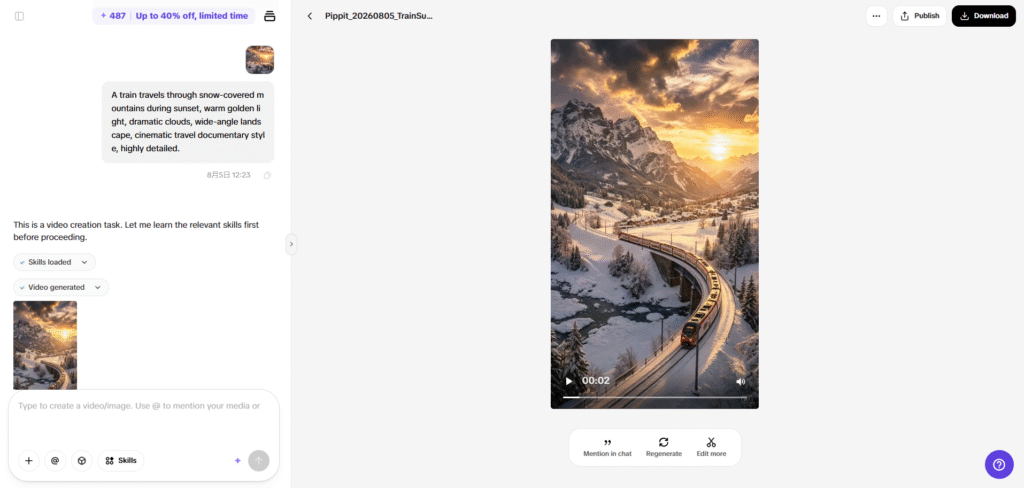
- Pippit’s AI video generator creates a recruitment video using your prompt and reference materials.
- The AI manages transitions, pacing, captions, avatars, voice, lyrics, and visual enhancements.
- Review the generated draft before publishing.
Step 3: Customize and share your campaign
- Click the “Download” tab to save the video, select “Regenerate” for changes, or click “Edit more” to open the editing interface.
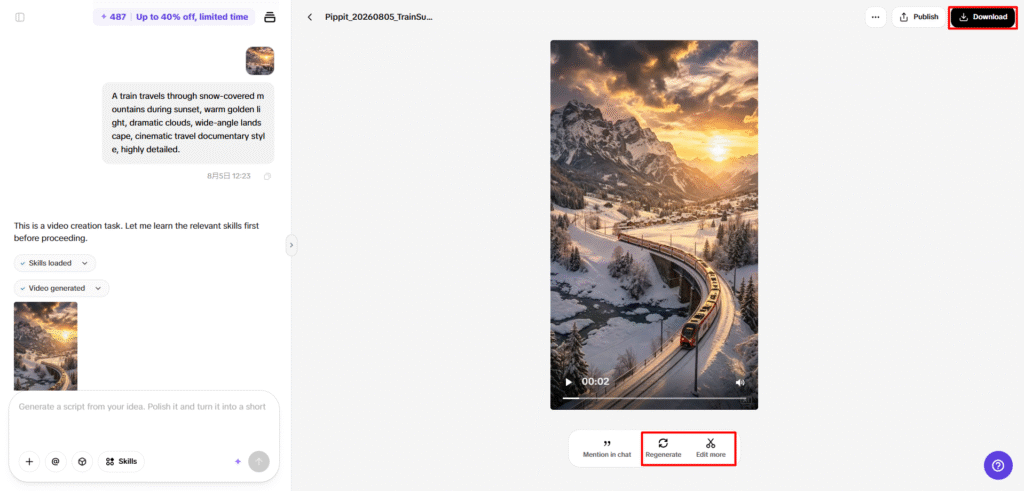
- Customize captions, add text, and adjust size, color, alignment, filters, and effects.
- Add music, remove backgrounds, and refine visuals.
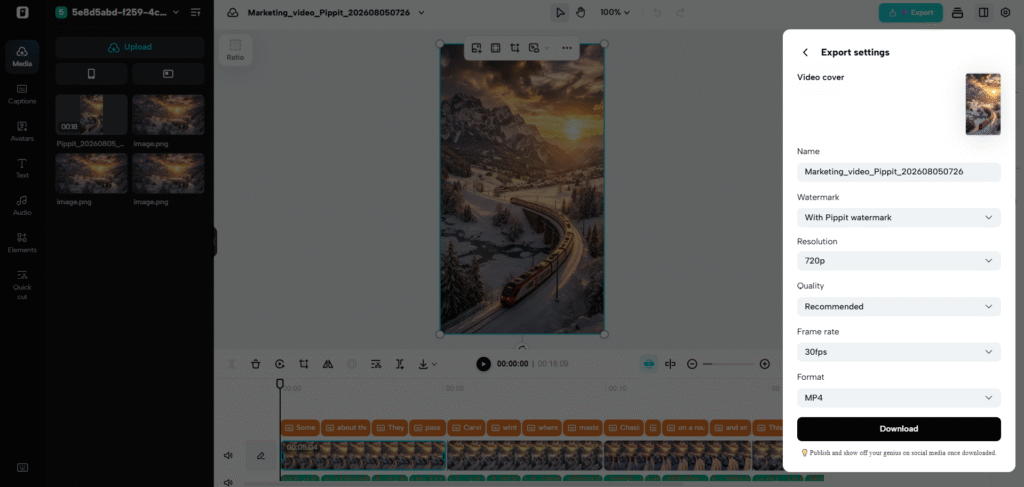
- Click “Export” after completing edits.
- Choose “Publish” for TikTok, Instagram, or Facebook, or click “Download” to save the video with the selected format, resolution, frame rate, and quality.
Best Practices for Creating Professional Recruitment Videos
The secret to a good professional recruitment video is steady branding, genuine communications, and targeted storytelling. Be consistent with logos, typography, and colors across all recruitment campaigns. Communicate values in the workplace using real-life examples, not promotion. Employee experiences should be combined with practical information about the roles, in a way that is interesting to the viewer. Short video clips tend to hold the audience’s interest and help to retain the message. Platform optimization offers the proper dimensions, captions, and formats for career sites and social recruiting platforms. Careful editing will give a professional and clear feel to the entire hiring message.
Recruitment Content Ideas Suitable for AI Video Generation
Several types of recruitment formats can be created in this manner, without compromising the quality of presentation, with structured AI assistance:
- Graduate hiring campaigns: Communicate career opportunities with great visuals and structured company presentations.
- Videos about Internships: Be open to learning, mentorship, and hands-on development.
- Department introduction videos – Present different teams in fun videos about the workplace and team introductions.
- Recruitment event promotions: Inform about hiring events with dynamic messages containing key information.
- Job opening announcements: Use professional branded graphics and job responsibilities to promote job openings.
- Employer branding videos: Reinforce your company’s brand and message on recruitment websites.
Improving Recruitment Videos Before Distribution
Careful consideration should be taken when creating all recruitment videos before they are publicly released on hiring platforms. Visual consistency should be consistent throughout the branding elements, transitions, and organization of scenes. For better accessibility, voiceovers must be both correctly pronounced and timed with the captions. Customized captions will be used to help increase viewer engagement and to meet the branding guidelines of the organization. Export settings should be the same as platform requirements so that playback can be maintained between various platforms. Final messaging must accurately reflect jobs, workplace culture, and hiring expectations prior to publication of the campaign.
Conclusion
Using recruitment videos for creating opportunities for communication, engaging visual storytelling, and employer messaging. AI-driven production makes content creation easier and cuts down on the time spent on traditional editing and preparation. The generation, customization, refinement, and exporting processes are all part of a single creative workflow in Pippit. Flexible editing tools, multiple generation models, and platform-ready exports help with professional recruitment communication via modern recruiting channels. Businesses can develop professional recruitment campaigns in a timely way, have a consistent brand, and offer informative recruitment experiences.